



$ npm install create-wdio
WebdriverIO Starter Toolkit 

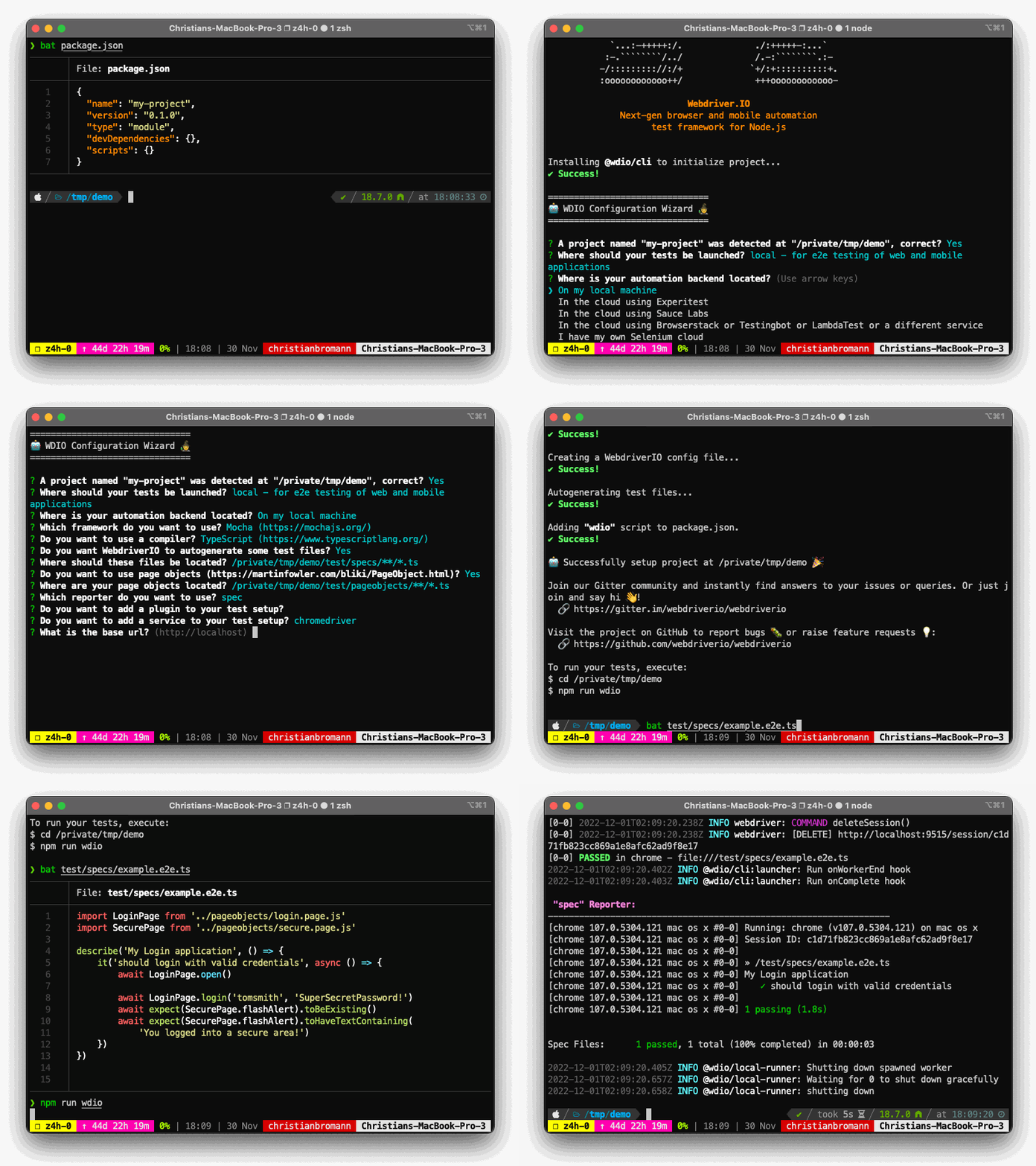
One command to create a fresh WebdriverIO project or add WebdriverIO to an existing project.
- Get Started Guide - How to get started with WebdriverIO
- Supported Options - command line parameters
create-wdio works on macOS, Windows, and Linux.
If something doesn’t work, please file an issue.
If you have questions or need help, please ask in our Discord Support channel.
Usage
To install a WebdriverIO project, you may choose one of the following methods:
npx
npx create-wdio@latest ./e2e
npx is a package runner tool that comes with npm 5.2+ and higher, see instructions for older npm versions
npm
npm init wdio@latest ./e2e
npm init <initializer> is available in npm 6+
yarn
yarn create wdio@latest ./e2e
yarn create <starter-kit-package> is available in Yarn 0.25+
pnpm
pnpm create wdio ./e2e
pnpm create <starter-kit-package> is available in pnpm v7+
It will create a directory called e2e inside the current folder.
Then it will run the configuration wizard that will help you set-up your framework.
Supported Options
You can pass the following command line flags to modify the bootstrap mechanism:
--dev- Install all packages asdevDependencies(default:true)--yes- Will fill in all config defaults without prompting (default:false)--npm-tag- use a specific NPM tag for@wdio/clipackage (default:latest)
Every question of the configuration wizard also has a flag, e.g. --runner, --framework, --typescript, --browsers, --reporters or --services. A flag answers its question and the wizard only asks the rest. Combined with --yes the setup runs without any prompt, e.g. for a coding agent or a CI job:
npm init wdio@latest ./e2e -- --yes --framework cucumber --no-typescript --reporters spec,junit
Run npm init wdio@latest -- --help for every flag and the values it accepts. Boolean flags take a --no- prefix. An invalid value, or a flag for a question that does not apply to your setup, exits with code 2.
For more information on WebdriverIO see the homepage.
Current Tags
- 10.1.0 ... latest (a month ago)
- 10.2.0-alpha.100.sha-b38abd894 ... next (a month ago)
- 9.33.1 ... v9 (24 days ago)
83 Versions
- 9.33.1 ... 24 days ago
- 9.33.0 ... 24 days ago
- 10.2.0-alpha.100.sha-b38abd894 ... a month ago
- 10.1.0 ... a month ago
- 10.0.2 ... 2 months ago
- 10.1.0-alpha.30 ... 2 months ago
- 10.1.0-alpha.29 ... 2 months ago
- 10.0.1 ... 2 months ago
- 10.1.0-alpha.26 ... 2 months ago
- 10.1.0-alpha.25 ... 2 months ago
- 10.1.0-alpha.19 ... 2 months ago
- 10.1.0-alpha.18 ... 2 months ago
- 10.0.0 ... 2 months ago
- 10.0.0-alpha.175 ... 2 months ago
- 10.0.0-alpha.165 ... 2 months ago
- 10.0.0-alpha.163 ... 2 months ago
- 10.0.0-alpha.172 ... 2 months ago
- 10.0.0-alpha.171 ... 2 months ago
- 10.0.0-alpha.166 ... 2 months ago
- 10.0.0-alpha.162 ... 2 months ago
- 10.0.0-alpha.155 ... 2 months ago
- 10.0.0-alpha.150 ... 2 months ago
- 10.0.0-alpha.149 ... 2 months ago
- 10.0.0-alpha.148 ... 2 months ago
- 10.0.0-alpha.18 ... 2 months ago
- 9.32.0 ... 2 months ago
- 9.32.0-alpha.14 ... 2 months ago
- 9.32.0-alpha.13 ... 2 months ago
- 9.32.0-alpha.6 ... 2 months ago
- 9.32.0-alpha.0 ... 2 months ago
- 9.32.0-alpha.3 ... 2 months ago
- 9.31.6 ... 3 months ago
- 9.31.2 ... 3 months ago
- 9.30.1 ... 4 months ago
- 9.30.0 ... 4 months ago
- 9.29.1 ... 5 months ago
- 9.29.0 ... 5 months ago
- 9.28.0 ... 6 months ago
- 9.27.2 ... 6 months ago
- 9.27.1 ... 7 months ago
- 9.27.0 ... 8 months ago
- 9.26.1 ... 8 months ago
- 9.26.0 ... 8 months ago
- 9.25.0 ... 9 months ago
- 9.21.0 ... a year ago
- 9.18.2 ... a year ago
- 9.18.2-alpha.2 ... a year ago
- 9.18.2-alpha.1 ... a year ago
- 9.18.0 ... a year ago
- 9.17.1 ... a year ago
- 9.17.0 ... a year ago
- 8.4.10 ... 2 years ago
- 8.4.9 ... 2 years ago
- 8.4.8 ... 2 years ago
- 8.4.7 ... 3 years ago
- 8.4.6 ... 3 years ago
- 8.4.5 ... 3 years ago
- 8.4.4 ... 3 years ago
- 8.4.3 ... 3 years ago
- 8.4.2 ... 3 years ago
- 8.4.1 ... 3 years ago
- 8.4.0 ... 3 years ago
- 8.3.4 ... 3 years ago
- 8.3.3 ... 3 years ago
- 8.3.2 ... 3 years ago
- 8.3.1 ... 3 years ago
- 8.3.0 ... 3 years ago
- 8.2.5 ... 3 years ago
- 8.2.4 ... 3 years ago
- 8.2.3 ... 4 years ago
- 8.2.2 ... 4 years ago
- 8.2.1 ... 4 years ago
- 8.2.0 ... 4 years ago
- 8.1.0 ... 4 years ago
- 9.0.0 [deprecated] ... 4 years ago
- 8.0.0 ... 4 years ago
- 7.2.0 ... 4 years ago
- 7.1.1 ... 5 years ago
- 7.1.0 ... 5 years ago
- 7.0.3 ... 5 years ago
- 7.0.2 ... 5 years ago
- 7.0.1 ... 5 years ago
- 7.0.0 ... 5 years ago
 wdio-user
- ejs ^7.0.1
- chalk ^6.0.1
- execa ^10.1.0
- yargs ^18.2.0
- semver ^7.6.3
- inquirer ^14.2.3
- commander ^15.0.0
- type-fest ^5.10.0
- cross-spawn ^7.0.3
- read-package-up ^12.0.0
- import-meta-resolve ^4.1.0
- normalize-package-data ^8.0.0
- @types/ejs ^3.1.5
- @types/yargs ^17.0.33
- @types/semver ^7.5.8
- @types/fs-extra ^11.0.4
- @types/cross-spawn ^6.0.6
- @types/normalize-package-data ^2.4.4