
A unique way to read a binary file in the browser and the server.



$ npm install jDataView
jDataView - A unique way to read a binary file in Javascript.
jDataView provides a standard way to read binary files in all the browsers. It follows the DataView Specification and even extends it for a more practical use.
Explanation
There are three ways to read a binary file from the browser.
-
The first one is to download the file through XHR with charset=x-user-defined. You get the file as a String, and you have to rewrite all the decoding functions (getUint16, getFloat32, ...). All the browsers support this.
-
Then browsers that implemented WebGL also added ArrayBuffers. It is a plain buffer that can be read with views called TypedArrays (Int32Array, Float64Array, ...). You can use them to decode the file but this is not very handy. It has big drawback, it can't read non-aligned data. It is supported by Firefox 4 and Chrome 7.
-
A new revision of the specification added DataViews. It is a view around your buffer that can read arbitrary data types directly through functions: getUint32, getFloat64 ... Only Chrome 9 supports it.
And one way to read a binary file from the server.
- NodeJS Buffers. They appeared in Node 0.4.0. Node 0.5.0 added a DataView-like API. And Node 0.6.0 changed the API naming convention.
jDataView provides the DataView API using the best available option between Strings, TypedArrays, NodeJS Buffers and DataViews.
API
See the Typed Array Specification subsection�8 (�The�DataView View�Type�) for a detailed API.
Constructor
- new jDataView(buffer, offset, length, littleEndian=true)
- buffer can be either a String, an ArrayBuffer, or a Node.js Buffer
- littleEndian is a default value for the view
Specification API
The wrapper satisfies all the specification getters.
- getInt8(byteOffset)
- getUint8(byteOffset)
- getInt16(byteOffset, littleEndian)
- getUint16(byteOffset, littleEndian)
- getInt32(byteOffset, littleEndian)
- getUint32(byteOffset, littleEndian)
- getFloat32(byteOffset, littleEndian)
- getFloat64(byteOffset, littleEndian)
Extended Specification
Addition of a littleEndian argument to the constructor. It will be the default value of the getters if their littleEndian value is undefined.
- jDataView(buffer, offset, length, littleEndian=true)
The byteOffset parameter is now optional. If you omit it, it will read right after the latest read offset. You can interact with the internal pointer with those two functions.
- seek(byteOffset)
- Moves the internal pointer to the position
- tell()
- Returns the current position
Addition of getChar and getString utilities.
- getChar(byteOffset)
- getString(length, byteOffset)
Addition of createBuffer, a utility to easily create buffers with the latest available storage type (String or ArrayBuffer).
- createBuffer(byte1, byte2, ...)
Shortcomings
- Only the Read API is being wrapped, jDataView does not provide any
setmethod. - I found that most files we want to read are in littleEndian due to x86 architecture. I changed the default behavior of getters to be littleEndian instead of bigEndian.
Example
First we need a file. Either you get it through XHR or use the createBuffer utility.
var file = jDataView.createBuffer(
	0x10, 0x01, 0x00, 0x00, // Int32 - 272
	0x90, 0xcf, 0x1b, 0x47, // Float32 - 39887.5625
	0, 0, 0, 0, 0, 0, 0, 0, // 8 blank bytes
	0x4d, 0x44, 0x32, 0x30, // String - MD20
	0x61                    // Char - a
);
Now we use the DataView as defined in the specification, the only thing that changes is the j before jDataView.
var view = new jDataView(file);
var version = view.getInt32(0); // 272
var float = view.getFloat32(4); // 39887.5625
The wrapper extends the specification to make the DataView easier to use.
var view = new jDataView(file);
// A position counter is managed. Remove the argument to read right after the last read.
version = view.getInt32(); // 272
float = view.getFloat32(); // 39887.5625

// You can move around with tell() and seek()
view.seek(view.tell() + 8);

// Two helpers: getChar and getString will make your life easier
var tag = view.getString(4); // MD20
var char = view.getChar(); // a
You can use a patched version of jQuery that supports ArrayBuffer for AJAX.
$.get(
  'data.bin',
  function (view) {
    var tag = view.getString(4); // 'MD20'
    var version = view.getUint32(); // 732
  },
  'dataview'
);
Changelog
- December 22 2011: Added IE6-9 support by scintill
- November 30 2011:
- Added NodeJS Buffer support + NPM Package.
- Added support for NaN and Infinity in the float shim.
- Added
buffer,byteLengthandbyteOffsetattributes. - Fixed bugs using non zero ```byteOffset` and added more bound checks.
- September 21 2011: Added a missing
littleEndianargument on getInt16. - April 28 2011: Seeking to the end of file no longer throws an error.
- April 26 2011: Fixed a bug with extremely large unsigned 32bit being considered as signed. (Solution).
- April 8 2011: Added littleEndian argument on the constructor. Opera 11.50 does not fully implement DataView, improved check.
Demos
-
A simple tar viewer. It is a "Hello World" demo of how easy it is to use the library.
-
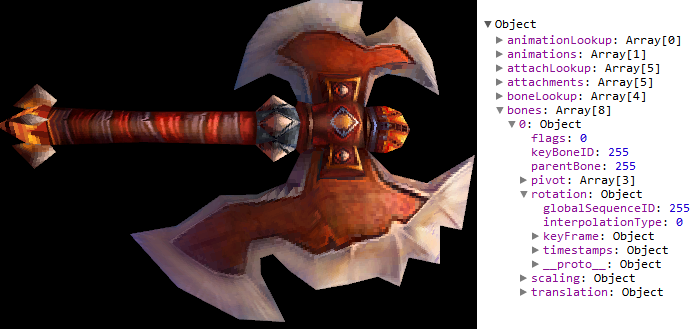
A World of Warcraft Model Viewer. It uses jDataView to read the binary file and then WebGL to display it.
-
A PhotoSynth WebGL Viewer by Visual Experiments. It uses jDataView to read the binary file and then WebGL to display it.

Please tell me if you made something with jDataView :)
Licence: Do What The Fuck You Want To Public License
Current Tags
- 2.3.0 ... latest (13 years ago)
 rreverser